
Wireless RFID Readers Buying Guide: Features, Specs, and Pricing
When you buy wireless rfid readers, look at main features, important specs, and price. These devices come in different types. Some are fixed readers. Others are mobile readers. You will see different ways to power them. Some use batteries. Some use a power adapter. Some use in-vehicle power. Wireless rfid readers connect in many ways. They use Wi-Fi or Bluetooth.
Here is a quick look at common features:
Feature/Specification | Description |
|---|---|
Types | Fixed and Mobile Readers |
Power Options | Power Adapter, PoE, Battery, In-Vehicle |
Connectivity | Wi-Fi, Bluetooth, LAN, Serial, Auxiliary Port |
Comparing wireless rfid readers helps you choose the best one for you. You can see real examples, like SHENZHEN MARKTRACE CO.,LTD. models. These show how the features work in real life. Making good choices starts with knowing what wireless rfid readers can do.
Key Takeaways
Learn about the types of RFID readers. There are fixed, mobile, and vehicle-mounted readers. Pick the one that fits your needs best.
Focus on accuracy and read range. RFID readers can be very accurate. This helps you manage inventory well.
Look at battery life for mobile readers. A strong battery lets you work all day without stopping.
Check durability ratings like IP65 or IP67. These ratings show if the reader can handle dust and water.
Make sure the reader works with your RFID systems and software. Test devices in your workplace to avoid problems later.
Think about how the reader connects. It can use Wi-Fi, Bluetooth, or cellular. Pick the option that works best for your tracking area.
Look at prices closely. Include the total cost, like tags, software, and support.
Find a vendor with good support. Training and fast help can make your RFID system work better.
Key Factors for Wireless RFID Readers
Essential Features
When you pick wireless rfid readers, you should look at the most important features for your business. Accuracy is a very important feature. You want your reader to catch every tag and not miss any. In businesses, rfid readers can be almost perfect. They can reach up to 100% accuracy. Barcode systems only get about 70%. This high accuracy helps you keep track of your inventory better and faster.
Technology | Accuracy Rate |
|---|---|
RFID | Up to 100% |
Traditional Barcode | About 70% |
Range is also important. How far your reader can scan tags will change how you set up your rfid systems. For example, the SHENZHEN MARKTRACE CO.,LTD. MR6211E model can read tags from far away, up to 10 meters. This is good for big warehouses or outside inventory tracking. The MR6221E is good for medium distances. The MR6261E is best for scanning things close by, like in stores or at events.
Model | Read Range | Description |
|---|---|---|
MR6211E | Up to 10 meters | Long-range, suitable for large areas |
MR6221E | Medium range | Ideal for medium-range applications |
MR6261E | Close-up | Designed for close-up scanning |
Reliability is something you must have in an rfid reader. You want your device to work every time you scan a tag. In factories, the read rate shows how many tags the reader can scan quickly. A high read rate means your inventory tracking will not slow down. Things like good hardware, how you set up your rfid systems, and the place you use them can change how reliable they are.
Durability is important too. You might use your mobile device in hard places like factories or outside. A strong reader can survive drops, dust, and even water. This helps your inventory tracking keep working well.
Battery life matters for mobile rfid readers. You do not want your device to stop working during a busy day. Many smart tag batteries last from 3 to 10 years. How long they last depends on how much you use them and where you use them. Some active rfid tags can last up to 10 years. This means you do not have to change batteries often.
Compatibility is another thing to check. Your rfid readers need to work with your rfid systems, software, and network. Testing your device in your real place helps you find problems early. Checking compatibility early can save you time and money.
Tip: Always test your rfid readers with your real tags and software before you buy a lot of devices. This helps you find problems early.
Important Specs
You should look at the specifications when you compare rfid readers. These details tell you how well the device will work for you. Here are some important specifications to check:
Read Range: This tells you how far the reader can scan rfid tags. Long-range models like the MR6211E can read tags up to 10 meters away. Medium-range and close-up models like the MR6221E and MR6261E are good for other needs.
Read Rate: This shows how many tags the reader can scan quickly. A high read rate is good for fast inventory tracking.
Battery Life: For mobile readers, check how long the device can run before you need to charge or change the battery.
Durability Ratings: Look for ratings like IP65 or IP67. These show the reader can handle dust and water.
Compatibility: Make sure the reader works with the rfid tags and software you use. Testing early helps stop problems.
Connectivity: Check if the device uses Wi-Fi, Bluetooth, or other ways to connect. This changes how you connect the reader to your rfid systems.
Pricing Overview
The price of wireless rfid readers can change based on the features, specifications, and type of device you pick. Handheld mobile readers usually cost between $500 and $3,000. Fixed readers can cost from $2,000 to $8,000. Vehicle-mounted readers may cost more, depending on the features and range.
You might pay more for special features like longer read range, better durability, or longer battery life. The brand and how many devices you need also change the total price. When you plan your budget, remember to add the cost of rfid tags, software, and any setup or support services.
Note: Buying good rfid readers can save you money later by making fewer mistakes and helping you track inventory faster.
Picking the right wireless rfid reader means looking at all these key things. You want a device that fits your inventory tracking, works with your rfid systems, and gives you the features you need to do well.
What Are Wireless RFID Readers?
RFID Reader Basics
Wireless rfid readers help you find and track things. You do not need to touch the items. The reader sends radio waves to tags. The tags send back information. You can put tags on boxes, tools, or ID cards. Wireless rfid readers let you get data fast and without mistakes.
Every rfid reader has many parts. These parts work together to help the reader do its job.
Component/Function | Description |
|---|---|
Reader (Interrogator) | Reads and writes to tags |
Reader Antennas | Sends power and commands to tags, receives tag data |
Cable | Connects antennas to the reader |
Tags | Placed on or in objects |
Software Application | Moves data from the reader to your computer system |
Air Interface Functions | Reads and writes data, handles many tags at once |
Reader Management | Controls how the reader works |
Firmware | Runs the reader’s software |
User Interface | Lets you set up the reader |
Network Communication | Connects to computers or networks |
Protocol Support | Works with different rfid standards |
I/O Controls | Can control lights or sensors |
Form Factors | Comes in handheld or fixed designs |
Antenna Functions | Sends and receives signals, changes size and strength |
You can use rfid readers in lots of places. Some readers are small and easy to carry. Others stay in one spot. You can pick the reader that works best for you.
Tip: You can connect rfid readers to your software and network. This helps your system work better.
Main Applications
Rfid technology is used in many jobs. Each job uses rfid for different reasons. Here are some ways people use rfid readers:
In healthcare, you can keep track of patients and help them stay safe. Hospitals use rfid to stop mistakes.
In transportation and logistics, you can follow your supplies and see where things go.
In manufacturing, you can watch products as they move in the factory. You can also check your inventory.
In agriculture, you can check crops and keep track of animals.
In government and public services, you can protect borders and manage important things.
In education, you can check who is at school and make it safer.
In event management, you can keep track of equipment and supplies.
Here is a table that shows how different jobs use rfid readers:
Industry | Primary Applications |
|---|---|
Healthcare | Patient tracking, safety, reducing errors |
Transportation & Logistics | Supply chain management, asset tracking |
Manufacturing | Work-in-process tracking, inventory management |
Agriculture | Crop monitoring, livestock tracking |
Government & Public Services | Border protection, asset management |
Education | Attendance management, security systems |
Event Management | Asset tracking, inventory management |
Rfid lets you check your inventory in real time. You can see what comes in and goes out fast. You can also do audits quickly. Many businesses use rfid readers because they save time and help stop mistakes.
Note: Using rfid readers makes your work easier and more correct. You can keep your data safe and up to date.
RFID Reader Features to Compare
Frequency Bands
When you choose rfid readers, you need to know about frequency bands. Each band works best for certain jobs. The main frequency bands are Low Frequency (LF), High Frequency (HF), Ultra High Frequency (UHF), and Microwave. You can see the differences in the table below:
Frequency Band | Frequency Range | Characteristics and Applications |
|---|---|---|
Low Frequency (LF) | 125KHz/134.2KHz | Low cost, short range (<10cm), used for access control and animal tracking |
High Frequency (HF) | 13.56MHz | Medium range (10-150cm), used for ID cards and electronic tickets |
Ultra High Frequency (UHF) | 902-928MHz | Long range (up to 20m), fast data, used for supply chain and library tracking |
Microwave | 2.45GHz | Very long range, strong signal, used for vehicle and railway tracking |
Most mobile readers and fixed readers use UHF because it gives you a good balance of range and speed. You can use LF for animal tracking or access control. HF works well for ID cards. Microwave is best for vehicle tracking over long distances.
Read Range
Read range tells you how far your rfid readers can scan a tag. This is important for both mobile readers and fixed readers. Some readers can scan tags from just a few centimeters away. Others can reach up to 20 meters. The table below shows some popular models and their ranges:
RFID Reader Model | Minimum Read Range | Maximum Read Range |
|---|---|---|
Encompass® 4 Reader | 12 ft (3.7 m) | 17 ft (5.2 m) |
HID TSL 2128P Bluetooth® UHF RFID Reader | N/A | 29.5 ft (9 m) |
Zebra RFD40 series | N/A | 20+ ft (6+ m) |
If you need to scan items in a warehouse, you might want a fixed reader with a long range. For close-up tracking, mobile readers with a short range work better. Always match the read range to your tracking needs.
Connectivity Options
You need to connect your rfid readers to your computer systems. Good connectivity helps you collect data fast and keep your tracking up to date. The main options are Wi-Fi, Bluetooth, and Cellular.
Wi-Fi
Wi-Fi lets your mobile readers and fixed readers send data to your network in real time. You can use Wi-Fi in warehouses, stores, or offices. This helps you track items as soon as you scan them.
Bluetooth
Bluetooth is great for mobile readers. You can connect your reader to a phone or tablet. This makes it easy to move around and scan items in different places. Bluetooth works well for retail, healthcare, and small warehouses.
Cellular
Cellular lets your rfid readers work anywhere you have a mobile signal. You can use this for tracking items in trucks or remote locations. Cellular is best when you need to send data from places without Wi-Fi.
Tip: Choose the connectivity that fits your tracking environment. Wi-Fi is best for fixed locations. Bluetooth is good for mobile use. Cellular is great for remote tracking.
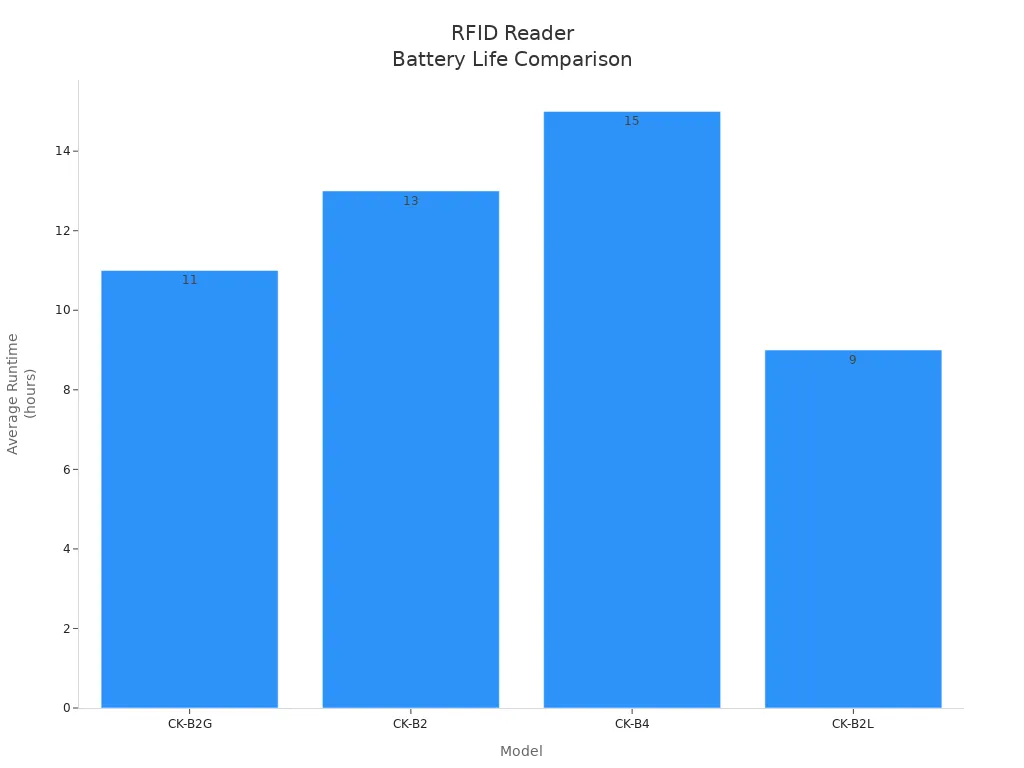
You can see that battery life changes based on how you use your rfid readers. Using Wi-Fi or Bluetooth all day can drain the battery faster. Always check the battery life if you plan to use mobile readers for long hours.
Battery Life
Battery life is very important when using rfid readers. You want your device to last all day at work. If it stops, you could lose important tracking data. Most mobile rfid readers have rechargeable batteries. Some can work for 8 to 12 hours on one charge. If you use them less, they might last even longer. Always check the battery details before buying. Look for battery size in mAh, how many hours it runs, and how long it takes to charge. If you track things for a long time, choose a reader with a strong battery. Some readers let you change batteries, so you do not have to stop working. This helps you keep tracking during busy times.
Tip: If your rfid reader lets you swap batteries, always keep a spare charged. This helps your tracking stay smooth and reliable.
Durability
Durability helps rfid readers last in tough places. You might use them in warehouses, outside, or in factories. Drops, dust, and water can break weak readers. Strong rfid readers have hard cases and special ratings like IP65 or IP67. These ratings mean the device can handle dust and water.
Here is a simple guide to durability ratings:
Rating | Protection Level |
|---|---|
IP65 | Keeps out dust, blocks water jets |
IP67 | Keeps out dust, safe in water for a short time |
If you use rfid readers outside or in rough places, pick one with a high rating. This helps your tracking keep going even when things get tough.
Compatibility
Compatibility means your rfid readers work with your tracking systems. You want your readers to connect to your software, network, and tags. Some rfid readers work with many tag types and different software. Others only work with certain systems. Check if your reader supports the tag types you use, like UHF, HF, or LF. Also check if it works with your software using APIs or SDKs, and if it connects by Wi-Fi, Bluetooth, or cellular. Test your rfid readers with your tracking software before buying a lot. This helps you find problems early and keeps your system working well.
Note: Good compatibility saves time and money. It makes tracking easier and more correct.
Types of Wireless RFID Readers
You can pick from three main types of wireless rfid readers. Each type is good for different jobs and places. Knowing the differences helps you choose the right device.
Handheld RFID Device
Handheld rfid devices are easy to carry. You can move around and scan tags fast. These devices are great for busy places like stores and warehouses.
Pros and Cons
Here is a table that compares handheld, fixed, and vehicle-mounted rfid readers:
Feature | Handheld Readers | Fixed Readers | Vehicle-Mounted Readers |
|---|---|---|---|
Power Source | Battery-powered | Wired, constant power | Wired, often integrated with vehicles |
Mobility | Highly mobile, designed for operators | Stationary, fixed installations | Mobile, mounted on vehicles |
Scanning Method | Manual or short bursts | Continuous scanning | Continuous scanning |
Coverage | Variable, depends on operator movement | Precise, can cover defined areas | Combines fixed coverage with mobility |
Throughput | Lower, handles fewer tags per second | High, processes hundreds/thousands of tags | Moderate, depends on vehicle speed |
Setup and Deployment | Quick, minimal setup required | Complex, requires planning and installation | Moderate, requires vehicle integration |
Cost | Lower initial cost, ongoing battery costs | Higher upfront cost, low marginal cost | Moderate, depends on vehicle integration |
Tip: Handheld rfid devices are good for fast scanning and easy movement. They use batteries so you do not need wires.
Use Cases
Handheld rfid devices help with many tasks. You can use them for jobs in logistics and retail. Here is a table with common uses:
Use Case | Applications |
|---|---|
Warehouse Logistics Management | - Collect and compare information about goods coming in and going out |
- Scan shelf tags to find inventory locations | |
- Update inventory records with the ERP system in real time | |
- Get alerts for goods that are not normal | |
Retail Industry Inventory Counting | - Find product tags quickly in large groups |
and Theft Prevention | - Scan store areas to check if displays are correct |
- Help with restocking and moving products | |
- Work with EAS anti-theft systems to keep products safe |
You can use handheld rfid devices to scan shelf tags, check inventory, and stop theft. You can also update records right away.
Fixed RFID Readers
Fixed rfid readers stay in one spot. You put them in important places in your warehouse or factory. These readers scan tags by themselves and help you track lots of items.
Pros and Cons
Fixed rfid readers are fast and accurate. You do not have to move them. They scan tags all day and handle big amounts. You need to plan and install them carefully.
Use Cases
You can use them where there are lots of tags.
They collect data automatically and cut down on manual work.
You can put them on production lines for real-time tracking.
Fixed rfid readers scan tags even if they cannot see them.
They help you work better and make fewer mistakes.
Note: Fixed rfid readers are best for places where you need to scan lots of tags quickly.
Vehicle-Mounted RFID Readers
Vehicle-mounted rfid readers go on trucks, forklifts, or other vehicles. You can scan tags while moving around your site.
Pros and Cons
Vehicle-mounted rfid readers mix movement and coverage. You can scan tags as you drive. You need to connect them to your vehicle’s power.
Use Cases
Here is a table with the benefits of vehicle-mounted rfid readers:
Advantage | Description |
|---|---|
Loss Reduction | Stops unauthorized vehicle movement and logs unexpected departures to protect assets. |
Improved Utilization | Shows where vehicles are in real time, helping you use them better and cut down on idle time. |
Smart Maintenance | Lets you do maintenance based on use, making vehicles last longer and reducing downtime. |
Labor Saving | Automates check-ins and check-outs, so staff do not need to keep records by hand. |
Safety and Compliance | Controls who can enter certain areas and keeps a digital log of vehicle movements for audits. |
Strategic Insights | Collects data about fleet movement, helping with planning and saving money over time. |
You can use vehicle-mounted rfid readers for managing fleets, tracking assets, and smart maintenance. You get real-time data and save work.
Tip: Pick the rfid reader type that fits your job. Handheld rfid devices are good for quick scans. Fixed readers are best for tracking lots of items. Vehicle-mounted readers help you scan while moving.
Comparing RFID Reader Specs
Tag Read Speed
You need to know how fast rfid readers can scan tags. Tag read speed tells you how many tags your device can process in one second. This matters a lot in places like warehouses or factories. If you have many items to track, you want a reader that works quickly.
Many wireless rfid readers can scan more than 1,600 tags every second.
The data transfer speed often reaches about 100 Kbits per second.
A high tag read speed helps you finish inventory checks faster. You can move goods in and out without waiting. Fast rfid readers also help you avoid mistakes because they do not miss tags. When you compare rfid readers, always check the tag read speed in the specs.
Tip: Choose a reader with a high tag read speed if you need to scan many items at once.
Supported Protocols
Protocols are rules that rfid readers use to talk to tags. You want your reader to support the right protocols for your business. Some protocols work better for secure payments. Others are best for tracking items or people. Here is a table that shows the most common protocols and what they do:
Protocol | Frequency Type | Description |
|---|---|---|
ISO 14443 | High Frequency | Used for secure payments. Short range. Has encryption. |
ISO 15693 | High Frequency | Good for access control and inventory. No encryption. |
ISO 18000-3 | High Frequency | Used for item management. Not as common as ISO 15693. |
Near Field Communication | N/A | Based on ISO 14443. Lets the reader act like a tag. |
ISO 18000-6C | Ultra High Frequency | Based on EPC Gen 3. Used for passive UHF rfid systems. |
ISO 24730 | Active RFID | Used for active tags at 2.45 GHz. Helps with real-time location systems. |
You should match the protocol to your tags and your system. If you use UHF rfid, look for ISO 18000-6C support. For secure payments, ISO 14443 is best. Always check the protocol list before you buy new readers.
Memory and Data
Memory tells you how much data your rfid readers can store. This matters if you need to keep lots of records or scan many tags before sending data to your computer. Most modern rfid readers have enough memory for most jobs. Here is a table with common memory sizes:
Memory Type | RAM | ROM | Max Micro SD Card |
|---|---|---|---|
Example Reader | 3GB or 4GB | 32GB or 64GB | 256GB |
Many rfid readers can hold about 32,000 letters and numbers in their memory. Newer models keep getting better, so you can expect even more space in the future. If you need to store lots of data, pick a reader with a big memory or a slot for a micro SD card.
Most rfid readers let you add a micro SD card for extra space.
You can store tag data, logs, and even software updates.
Note: More memory means you can scan more tags before you need to upload data.
When you compare rfid readers, always check tag read speed, supported protocols, and memory size. These specs help you pick the best device for your work.
Software Integration
When picking a wireless RFID reader, you should think about how it connects to your software. Software integration lets your RFID reader send data to your computer programs. This helps you see tag information right away and use it fast.
Your RFID reader should work with your inventory system or asset tracking software. Good software integration saves time and stops mistakes. You do not need to type data by hand. The reader sends data straight to your system.
Here are things to check for software integration:
APIs and SDKs: Many RFID readers have APIs or SDKs. These tools help you connect the reader to your software. You can use them to build custom apps or add features.
Supported Platforms: Check if the reader works with Windows, Android, or iOS. Some readers only work with certain systems. Make sure the reader matches your devices.
Cloud Integration: Some RFID readers send data to cloud services. This lets you see your data from anywhere. You can use cloud dashboards to track items in real time.
Plug-and-Play Support: Some readers work right away with popular software. You do not need to write any code. This makes setup quick and easy.
Tip: Ask your vendor if the reader supports your software. You can also ask for a demo to see how integration works.
Here is a table to compare software integration features:
Feature | Why It Matters | What to Look For |
|---|---|---|
API/SDK Availability | Custom connections and features | Open APIs, clear documentation |
Platform Support | Works with your devices | Windows, Android, iOS |
Cloud Compatibility | Access data anywhere | Cloud sync, web dashboards |
Plug-and-Play | Easy setup | Pre-built software connectors |
You should also think about updates. Good RFID readers get software updates from the vendor. Updates fix bugs or add new features. This keeps your system safe and up to date.
If you use SHENZHEN MARKTRACE CO.,LTD. models like MR6211E, MR6221E, or MR6261E, you get strong software integration options. These readers support many platforms and offer APIs for custom solutions. You can connect them to your tracking software and see your data in real time.
Note: Good software integration makes your RFID system smarter and easier to use. It helps you get the most value from your investment.
RFID Reader Pricing Guide
Cost Factors
You need to know what affects the price of rfid readers before you buy. Many things can change the cost. Here are the main factors:
RFID tags and labels: These add to your total cost. Each label can cost from $0.10 to $5.00. The price depends on where you use them.
RFID hardware: This includes the readers and antennas. You need these for your system to work.
RFID software and middleware: You need software to manage your data and connect your readers to your tracking system.
Integration and deployment services: Setting up your rfid system takes time and skill. You may need help from experts.
Recurring costs: You will have ongoing expenses for maintenance and support.
The features you choose also affect the price. If you want longer read range, better reading performance, or more durable readers, you will pay more. The brand you pick can change the cost too. Well-known brands often cost more but offer better support. The number of readers you need for your asset tracking or retail inventory project will also change your budget.
Price Ranges by Type
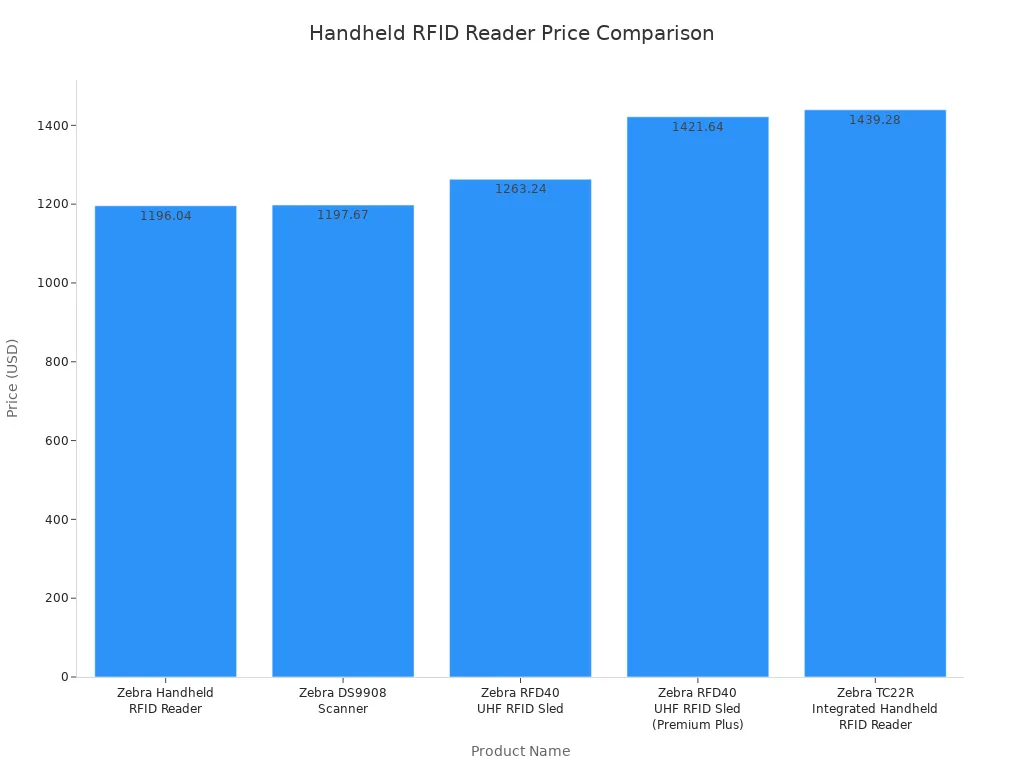
You will see different prices for each type of rfid reader. Here is a table with some common prices for handheld models:
Product Name | Price (USD) |
|---|---|
Zebra Handheld RFID Reader | $1196.04 |
Zebra DS9908 Scanner | $1197.67 |
Zebra RFD40 UHF RFID Sled | $1263.24 |
Zebra RFD40 UHF RFID Sled (Premium Plus) | $1421.64 |
Zebra TC22R Integrated Handheld RFID Reader | $1439.28 |
Handheld Device Pricing
Handheld rfid readers usually cost between $500 and $3,000. You can use these for mobile identification, retail, and warehouse inventory. They are easy to carry and work well for scanning items in different places.
Fixed Reader Pricing
Fixed rfid readers cost more. You can expect to pay from $2,000 to $8,000 for each one. These readers are best for fixed asset management and tracking in large areas. They scan tags all day and help you keep track of your asset locations.
Vehicle-Mounted Pricing
Vehicle-mounted rfid readers have higher prices. They often cost $3,000 or more. You use these on forklifts or trucks for tracking assets as they move. They are strong and built for tough jobs in retail or warehouse settings.
Total Cost of Ownership
You should think about the total cost of owning rfid readers. The price is not just the device. You need to add the cost of tags, software, and setup. You will also pay for support and updates. If you buy more readers, you may get a lower price for each one. Good planning helps you save money and get the best value for your tracking and asset management needs.
Tip: Always look at the big picture. The right rfid system can help you save time and money in retail, warehouse inventory, and asset tracking.
Choosing the Right RFID Reader
Assessing Needs
You should start by looking at your business needs before picking rfid readers. Think about where you will use the devices and what you want them to do. Some places need long-range scanning, while others need close-up accuracy. You can use the table below to help you decide what matters most for your application.
Criteria | Description |
|---|---|
UHF works well for long-range scanning. HF is better for short-range and secure data. | |
Form Factor & Installation Method | Fixed readers are best for batch reading. Handheld devices help with mobile tasks. |
Reading Performance | Look for high read rates and the ability to scan many tags at once. |
Environmental Protection Rating | High IP ratings, like IP65 or IP67, protect against dust and water in tough places. |
Interfaces & Protocols | Make sure the reader connects to your network and works with your software. |
Implementation Roadmap | Plan your steps from needs analysis to testing and full use. |
You should also think about your work environment. If you work in a warehouse, you may need a rugged device. If you work in a store, you may want something light and easy to carry.
Comparing Options
You will find many rfid readers on the market. Each one fits a different job. You can use the table below to match the right reader to your needs.
RFID Reader Type | Suitability for Retail Applications | |
|---|---|---|
Long-range | Large | Supermarkets and large retail spaces |
Middle-range | Moderate | Medium-sized stores and warehouses |
Short-range | Small | Small boutiques and specific item tracking |
For example, SHENZHEN MARKTRACE CO.,LTD. offers models for every range. The MR6211E works well for long-range needs, such as tracking items in big warehouses. The MR6221E fits medium-range jobs, like managing stock in a mid-sized store. The MR6261E is best for short-range tasks, such as checking items at a checkout counter or tracking event badges.
When you compare options, look at how each reader matches your daily tasks. Think about how far you need to scan, how many tags you need to read at once, and how the device will fit into your workflow.
Tip: Always test a few rfid readers in your real work setting before making a final choice.
Vendor Support
Good vendor support helps you get the most from your rfid readers. You should look for companies that offer clear setup guides, training, and fast help when you have questions. Some vendors, like SHENZHEN MARKTRACE CO.,LTD., provide strong support and updates for their products.
You should ask these questions when checking vendor support:
Does the vendor offer training for your team?
Can you get help quickly if something goes wrong?
Does the company provide software updates?
Will you get help with setup and integration?
A good vendor will help you solve problems fast. They will also help you keep your rfid system running smoothly as your needs grow.
Note: Strong vendor support can save you time and money. It helps you avoid delays and keeps your business moving.
Decision Checklist
Before you buy a wireless RFID reader, use this checklist to make sure you pick the best device for your needs. This list helps you remember the most important things to check. You can print it out or keep it on your phone when you talk to vendors.
1. Define Your Application
What do you want to track? (Inventory, assets, people, vehicles)
Where will you use the reader? (Warehouse, store, outdoors, vehicle)
2. Choose the Right Range
Do you need long-range scanning?
Example: Use the SHENZHEN MARKTRACE CO.,LTD. MR6211E for large warehouses or outdoor yards.
Do you need mid-range scanning?
Example: Pick the MR6221E for medium-sized stores or stockrooms.
Do you need short-range scanning?
Example: Select the MR6261E for retail counters or event check-ins.
3. Check Compatibility
Does the reader work with your RFID tags?
Can it connect to your current software and network?
Does it support the right frequency (UHF, HF, LF) for your tags?
4. Review Key Features
Is the read rate fast enough for your workflow?
Does the device have a strong battery for all-day use?
Is the reader durable enough for your environment? (Look for IP65 or IP67 ratings)
5. Confirm Connectivity
Will you use Wi-Fi, Bluetooth, or cellular to send data?
Does the reader support the connection type you need?
6. Compare Pricing and Total Cost
What is the price of the reader?
Did you include the cost of tags, software, and setup?
Will you need extra support or training?
7. Evaluate Vendor Support
Does the vendor offer training and fast help?
Can you get software updates and technical support?
8. Test Before You Buy
Can you try the reader in your real work setting?
Does it scan your tags and send data to your system without problems?
Tip: Always ask for a demo or trial before making your final choice. Testing the reader in your own environment helps you avoid surprises.
Quick Reference Table
Step | What to Check | Example Model |
|---|---|---|
Range | Long, Mid, or Short | MR6211E, MR6221E, MR6261E |
Compatibility | Tags, Software, Frequency | UHF, HF, LF support |
Durability | IP Rating, Build Quality | IP65/IP67 |
Connectivity | Wi-Fi, Bluetooth, Cellular | As needed |
Vendor Support | Training, Updates, Help Desk | SHENZHEN MARKTRACE CO.,LTD. |
You can use this checklist to compare different RFID readers. It helps you stay organized and make a smart choice for your business.
You should pay attention to the key things when picking a wireless rfid reader. Look at features, specs, and price to find what works best. Always compare different rfid models before you choose. Ask vendors for demos or help.
Remember: Try rfid readers in your real work area. This helps you avoid mistakes.
Quick Checklist:
Check rfid range and compatibility
Review battery life and durability
Compare prices and support
FAQ
What is a wireless RFID reader?
A wireless RFID reader lets you scan RFID tags without wires. You can move around with it or install it in one place. It sends data to your computer or phone using Wi-Fi, Bluetooth, or cellular networks.
How far can a wireless RFID reader scan?
The scan range depends on the model. Some readers, like the MR6211E, can scan up to 10 meters. Others work best at shorter distances. Always check the product specs for exact range.
Which industries use wireless RFID readers?
You will find wireless RFID readers in many industries. Common uses include retail, logistics, healthcare, manufacturing, education, and event management. These readers help track inventory, assets, and people.
How do I choose the right RFID reader for my business?
First, decide what you need to track. Next, check the required scan range and environment. Look for compatibility with your tags and software. Test a few models before buying. Vendor support also matters.
What is the difference between handheld and fixed RFID readers?
Handheld readers are portable. You can carry them and scan items anywhere. Fixed readers stay in one place and scan tags automatically. Choose handheld for mobility. Pick fixed for continuous scanning in set locations.
Do wireless RFID readers need special software?
Most RFID readers need software to collect and manage data. Some come with built-in apps. Others require you to connect them to your own system. Always check if the reader supports your software.
How long does the battery last on a handheld RFID reader?
Battery life varies by model and usage. Many handheld RFID readers last 8 to 12 hours on a full charge. Some let you swap batteries for longer use.
Can I use wireless RFID readers outdoors?
Yes, you can use many wireless RFID readers outdoors. Look for models with high durability ratings, like IP65 or IP67. These ratings mean the device can handle dust and water.
- Next>:Choosing Between UHF and HF Wireless RFID Readers

 2026-05-12
 Blogs
Blogs